BIMdiff: Object-Level Change Detection for BIM Models
How we built a change detection pipeline that handles GUID instability, processes 533K objects in 24 seconds, and gives BIM teams a clear view of what actually changed between model versions.
Your change report is lying to you
You compare two versions of an IFC model. The diff tool returns 200 additions and 200 deletions — but you only made a handful of changes. The rest is noise.
The reason is GUIDs. A designer deletes a column and recreates it in place — routine in Revit. The new column gets a new GUID. To any GUID-based tool, the old column vanished and a completely different one appeared. Across a federated model with thousands of objects, this makes change reports practically useless.
Research confirms the scale of the problem: on average, only 1.3% of GUIDs survive an IFC round-trip exchange, even with no modifications [1]. This was first documented in 2011, and as of 2025 the problem persists [2] — it's a structural interoperability issue, not something newer software will fix.
No mainstream tool solves this. Navisworks requires visual side-by-side comparison. Clash detection platforms don't track version changes. IfcOpenShell's ifcdiff [4] does object-level comparison but still relies on GUIDs. The question "what actually changed?" remains surprisingly hard to answer.
BIMdiff [3] is our answer.
BIMdiff: the pipeline
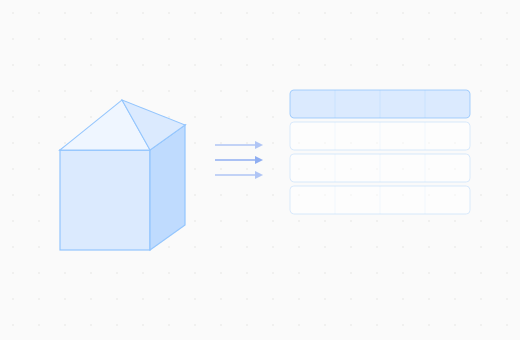
Instead of parsing IFC graphs or processing point clouds, we convert BIM models into flat tabular data — one row per building object, with columns for geometry, properties, and metadata. Think of it like converting a complex IFC file into a spreadsheet where every row is a wall, column, slab, or duct.
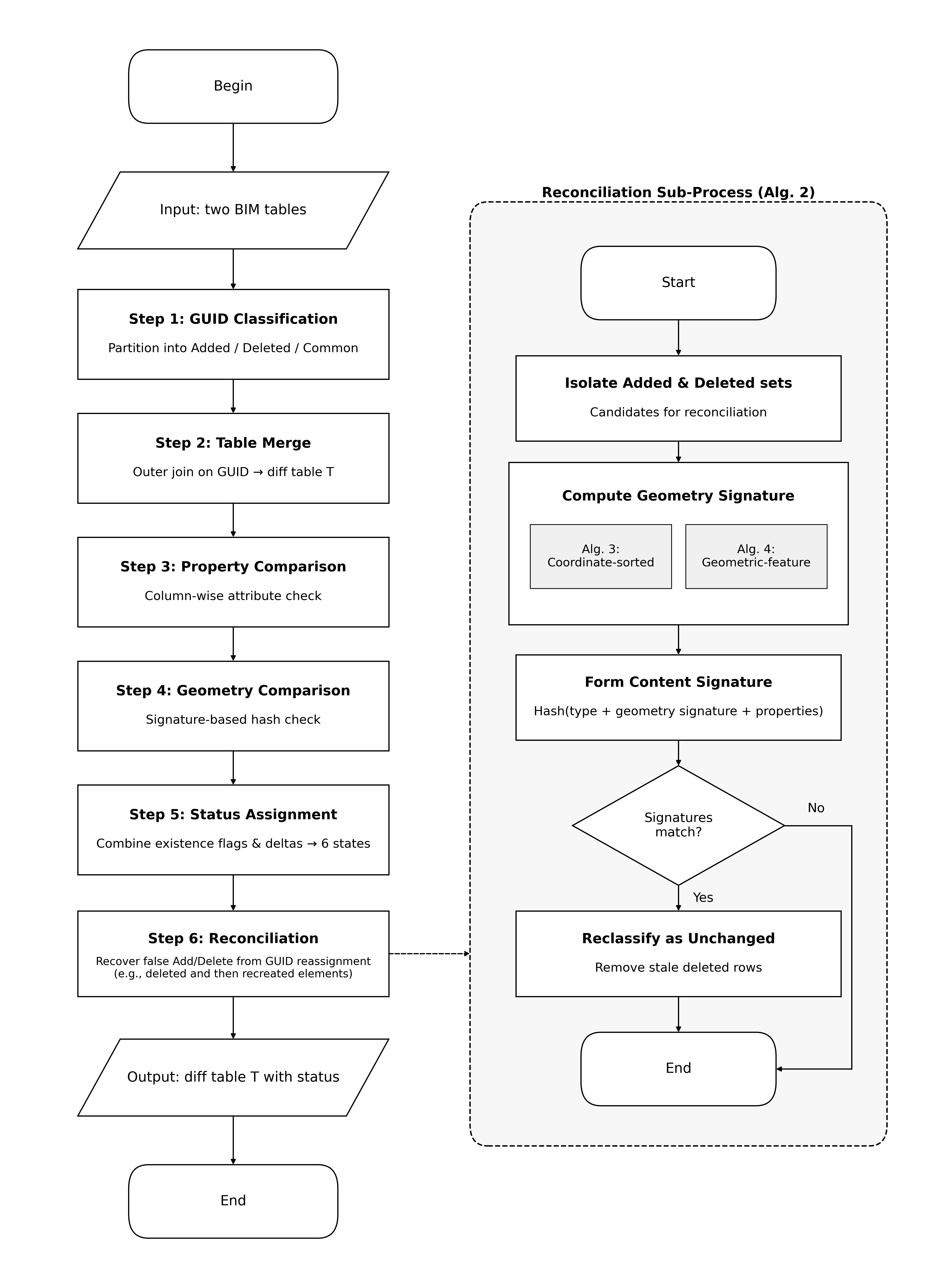
The pipeline works in six steps:
- GUID classification — Look at the GUIDs in both versions. Objects that appear only in the new version are initially labelled "Added"; objects only in the old version are "Deleted"; objects in both are "Common."
- Table merge — Join the two spreadsheets into one, matching rows by GUID. Each property gets an
_old/_newcolumn pair so you can see both values side by side. - Attribute comparison — For objects that exist in both versions, compare every property column. Did the fire rating change? Did the material change? This happens in one pass across all objects simultaneously.
- Geometry comparison — Compare geometry using deterministic hashes — a fingerprint computed from the mesh shape. If two objects have the same fingerprint, their geometry is identical.
- Status assignment — Based on what changed (attributes, geometry, both, or neither), assign each object one of six change statuses.
- Reconciliation — The critical step. Go back to the "Added" and "Deleted" objects and check: are any of them actually the same object with a different GUID? If so, reclassify them.
Six change statuses: not just "changed" or "unchanged"
Most diff tools give you a binary answer: changed or unchanged. BIMdiff breaks this down further, assigning each object one of six statuses [3]:
| Status | In old version | In new version | Attributes changed | Geometry changed |
|---|---|---|---|---|
| Added | No | Yes | — | — |
| Deleted | Yes | No | — | — |
| Unchanged | Yes | Yes | No | No |
| Property Changed | Yes | Yes | Yes | No |
| Geometry Changed | Yes | Yes | No | Yes |
| Geometry & Property Changed | Yes | Yes | Yes | Yes |
Why does this matter? Consider a real scenario: a structural engineer receives an updated architectural model before a coordination meeting. The change report shows 200 modifications. With a binary diff tool, she'd have to inspect all 200. With BIMdiff's six statuses, she can immediately filter to see that only 3 columns had geometry changes — the rest were property-only updates (material descriptions, cost codes) that don't affect her structural analysis. She reviews 3 objects instead of 200. The meeting starts on time.
This multi-dimensional view lets each discipline focus on what matters to them. Architects care about property changes. Structural engineers care about geometry changes to load-bearing elements. MEP coordinators care about spatial changes that might introduce new clashes. One diff report serves all of them.
Reconciliation: matching objects by fingerprint, not by name
The first five steps rely on GUIDs for initial alignment. Step 6 addresses what happens when GUIDs lie.
The idea is similar to matching people by fingerprint instead of by name. Even if a column gets a brand-new GUID after being deleted and recreated, its content hasn't changed — it's still the same type, same shape, same properties. BIMdiff computes a content signature for every "Added" and "Deleted" object — a fingerprint combining the object's IFC type, geometry hash, and serialized properties. If an "Added" object and a "Deleted" object share the same fingerprint, they're the same object with a different GUID. These pairs are reclassified as "Unchanged," cutting through the noise.
In our end-to-end tests, this reconciliation step recovered 79% of delete-recreate object pairs and improved overall status accuracy from 95.2% to 97.2% [3].
The geometry signature algorithms behind this — how we determine whether two meshes encode the same shape despite vertex reordering and floating-point noise — are covered in a separate report on Geometry Equivalence for BIM Objects.
Benchmarks
We benchmarked BIMdiff against ifcdiff (IfcOpenShell) [4] across seven real-world models ranging from 1.4K to 533K objects [3]. ifcdiff is currently the only open-source tool for object-level IFC differencing, making it the most direct comparison. All experiments ran on a workstation with a 12th Gen Intel Core i7-12700H CPU and 32 GB RAM.
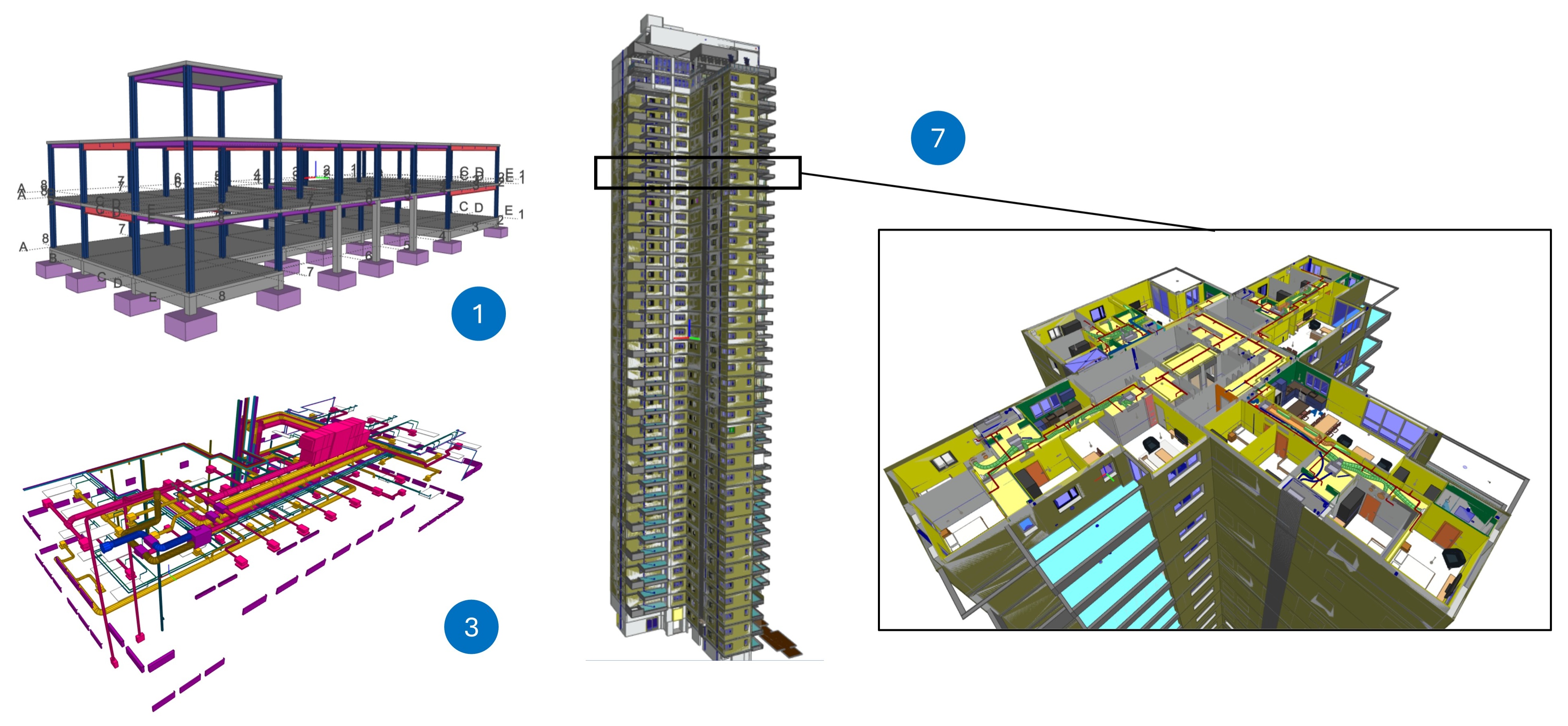
To put the largest model in context: 533,028 objects is roughly equivalent to a fully federated 40-story high-rise — architecture, structure, and MEP combined. On this model, ifcdiff exhausted 32 GB of RAM and crashed. BIMdiff completed the same comparison in 24.25 seconds using 4,065 MB of memory [3].
The gap is even clearer on mid-size models. On a multi-building architectural model (18,708 objects), ifcdiff consumed 6,394 MB and took 43 seconds. BIMdiff used 369–985 MB and finished in 2–3.4 seconds — a 6.5–17x memory reduction and up to 20x speed improvement [3].
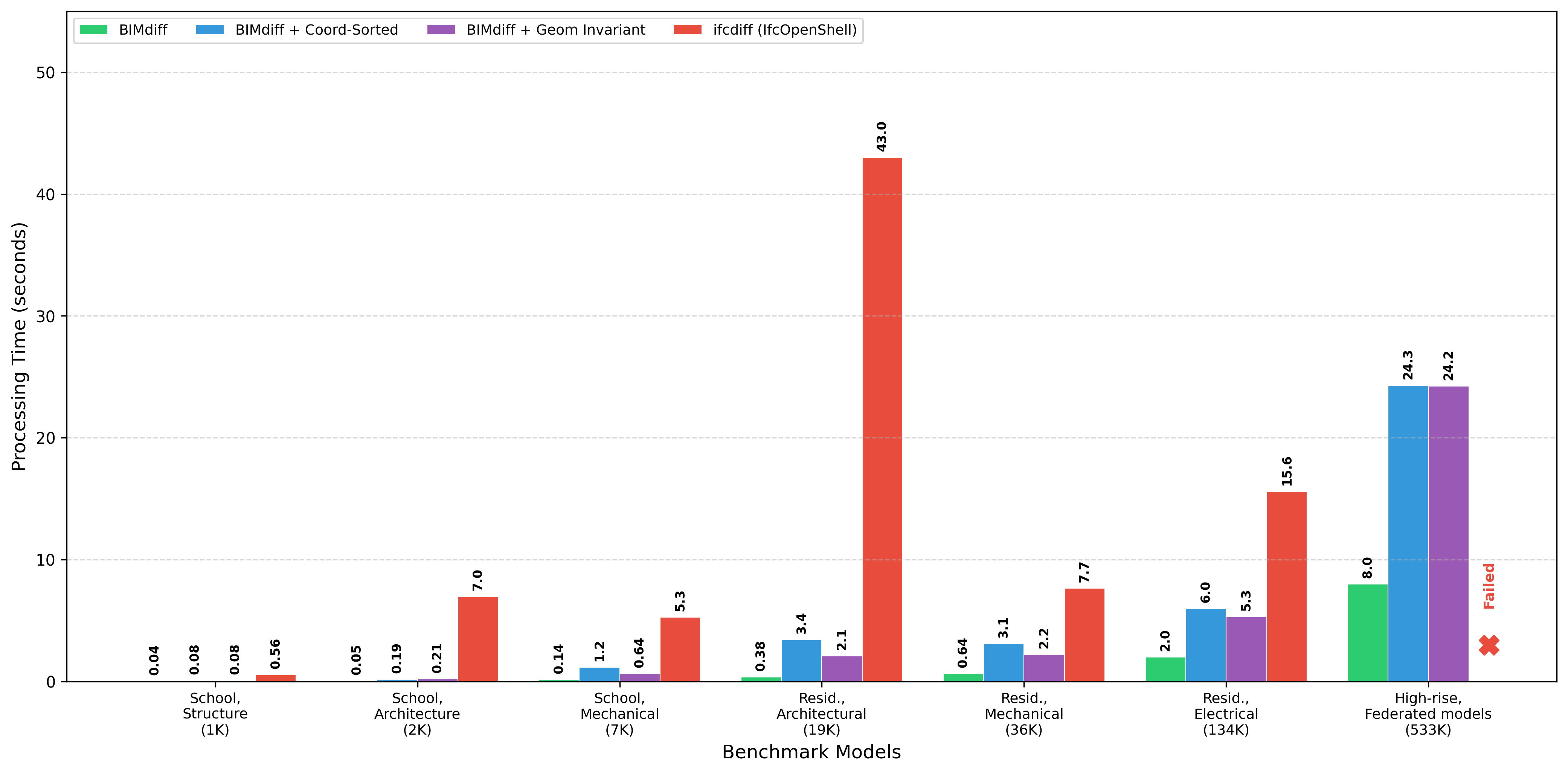
The performance gap comes from the data representation. IFC-native tools like ifcdiff traverse object graphs with deeply nested references — every comparison requires walking through layers of IFC relationships. BIMdiff flattens everything into columnar data and operates on entire columns at once, the same paradigm that makes tools like pandas and Excel fast for tabular analytics.
In practice: multi-disciplinary change tracking at SiloLink
We deployed the BIMdiff pipeline as part of SiloLink's infrastructure for multi-disciplinary change tracking. IFC models from architecture, structure, and mechanical disciplines are parsed into tabular data, diffed with BIMdiff, converted to GLB format [5], and visualized in a web-based 3D viewer.
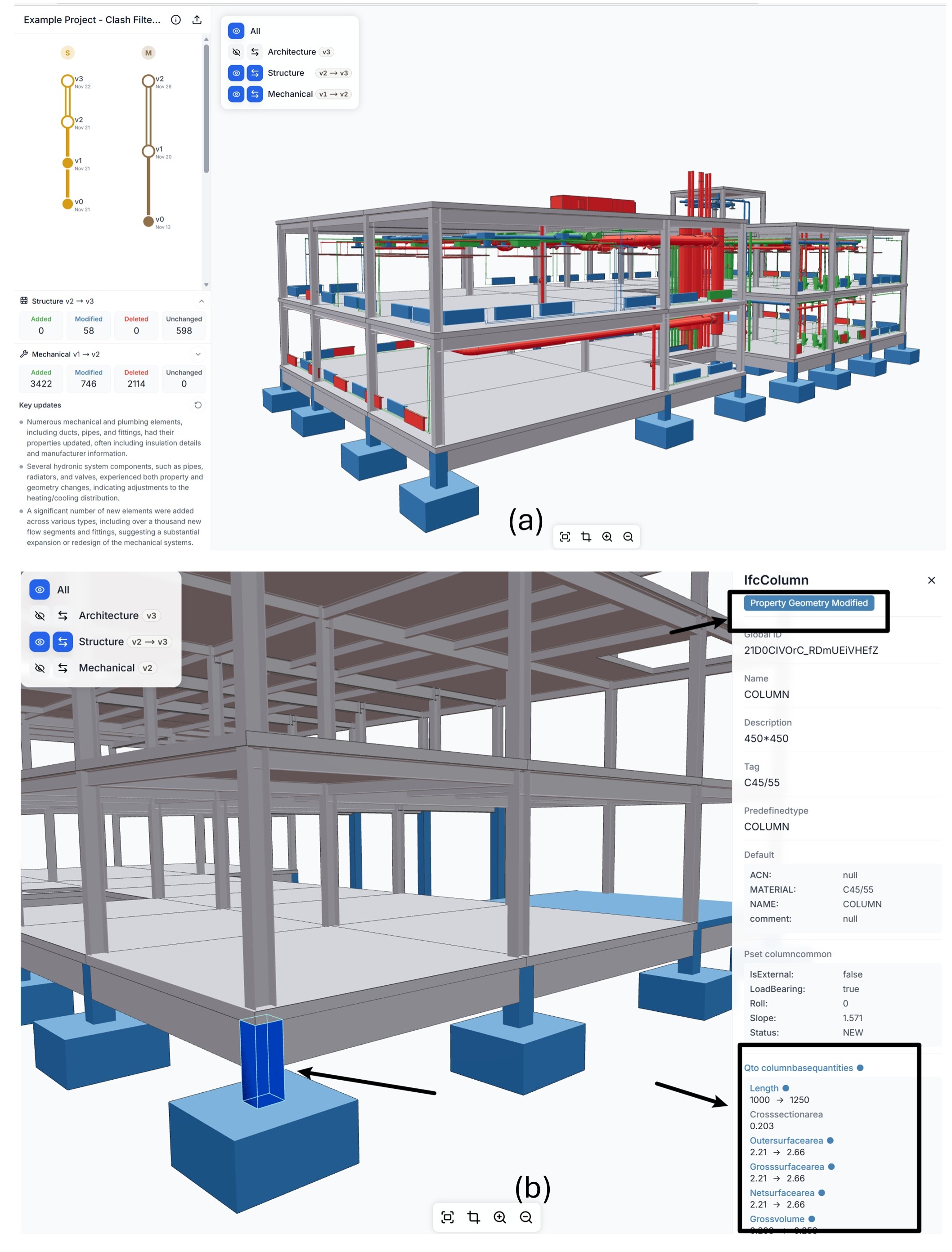
Designers navigate a version tree, switch between versions, and inspect object-level changes — including attribute-level diffs for individual elements like the column shown above. Added objects appear in green, deleted in red, and modified in blue.
Before BIMdiff, change review in a typical coordination workflow meant opening two models side by side and manually spotting differences — a process that could easily take 30 minutes and still miss subtle property changes. Now, when a structural engineer uploads a new model version, SiloLink automatically computes the diff in seconds, highlights the changes in the 3D viewer, and feeds the change context into downstream clash review. Teams review only what actually changed, not what the GUID system says changed.
What's next
BIMdiff solves the GUID instability problem and brings change detection down to seconds at industrial scale. A companion report goes deeper into the core algorithm:
Geometry Equivalence for BIM Objects — the geometry signature algorithms, their trade-offs between precision and robustness, and the 95.7% accuracy achieved on constructed datasets.
References
[1] G. Lee, J. Won, S. Ham, and Y. Shin, "Metrics for Quantifying the Similarities and Differences between IFC Files," Journal of Computing in Civil Engineering, vol. 25, no. 2, pp. 172–181, 2011. DOI: 10.1061/(ASCE)CP.1943-5487.0000077
[2] Z. Fang, X. Teng, Z. Shen, D. Yang, and X. Lin, "Standardizing Design-Stage Digital-Twin Assets in a Smart Home for Building Data Management," Buildings, vol. 15, no. 22, 2025. DOI: 10.3390/buildings15224096
[3] Z. Wang, C. Du, Q. Liu, and A. Borrmann, "BIMdiff: Object-Level BIM Change Detection with Identifier Reconciliation," Preprint, Technical University of Munich, 2026. DOI: 10.5281/zenodo.19356507
[4] IfcOpenShell Contributors, "IfcDiff — Compare changes between IFC models," IfcOpenShell Documentation, 2024. https://docs.ifcopenshell.org/ifcdiff.html
[5] The Khronos 3D Formats Working Group, "glTF 2.0 Specification," Khronos Group, 2021. https://registry.khronos.org/glTF/specs/2.0/glTF-2.0.html
This blog post is based on the paper by Wang, Du, Liu, and Borrmann [3]. Full text: doi.org/10.5281/zenodo.19356507